Ryan Singer
- Hands-On Product Leader
- Creator of Shape Up
- 20+ Years Design, Code, Execution
Article >
A Primer for Operators Who Need SoftwareHow to define what you need before you hire an expert
A friend of mine called me today and said "I need to build some software. Can you give me advice." He operates in a niche, highly regulated industry with complex logistics. There are many long email chains, sign-offs, manual steps, etc in his workflow he wants to automate.
He sees a clear need, he knows this needs to happen. But before he's ready to hire a software developer, he wants to better define what he's picturing (good instinct).
I'm sharing what I told him here because it can be a primer for anybody in the same situation, who's not a software developer but needs software in their workflow.
I advised him to break the problem into three different things.
Thing 1. What's called "business logic" or "domain logic."
This is about documenting how you do the process today, the painful way. What are the events, the triggers, all the manual steps. Every ugly detail. Get this email, write this draft, ask this person to approve it, then request the compliance form, etc. Go through individual past cases to work this out. My friend has one case with 300 emails that tells the real truth.
Mapping out how the business operates today tells you the truth that can't change. The way you do it will change with software, but it is crucial to understand what that software is supposed to replace. "This compliance step is triggered by this, needs this information, and this person is involved..." etc.When doing this step, the number one rule is don't describe what you want. This is only about the facts of how the process actually runs today, as ground truth. With this ground truth, you can then evaluate whether any potential new way is better or faster or complete or incomplete by weighing against it.
In my friend's case, he has a logistics partner and they are diagramming this together based on all the history from past cases.
Thing 2. The product concept.
Now we switch into describing the new thing. The "product" part is the new workflow you are envisioning. Instead of composing an email here, a notification gets triggered. Instead of requesting the form there, we autofill it and present it for approval here, etc.
When the software is something you need for yourself, you as the operator honestly know better than anyone else what this workflo should be. (I'm saying that as a product designer!)
This is where you make mockups and pull together patterns you've seen from software you've used before. Some people prefer drawing these as sketches, others go straight to prototyping with AI tools (more on that below).
Thing 3. The software development.
When the stakes are high, the software can't drop any steps or make mistakes. In my friend's case it would lead to not only lost business but also massive penalties.
So the translation from "here's the workflow we need" (Thing 2) to "this is software we can trust" requires expertise to ensure it is robust, reliable, correct, etc.
If it was just personal software, vibe-coding Thing 2 based on the knowledge in Thing 1 might be enough. But for high stakes production, we need to call out software development as a separate Thing 3.
Why not just jump to Thing 3? Hire a software developer from the start and have them just build it?
A good software engineer — even a very good one — is good at making things correct and reliable. But they won't understand your business or your problem.
Yes, there are people who can wear multiple hats and take you through the whole thing. But if you're not able to bring in someone like that (we're not cheap), you can make a ton of progress doing Things 1 and Things 2 yourself before moving to Thing 3. Then you're ready to give a software developer what they need to know to build the thing you actually want. (And if you struggle with Things 1 or 2 beforehand, this can give you ideas of what skills you need for help.)
Prototyping the product with AI
You can get really far with AI today. If you haven't used a frontier model yet for something like this, you should definitely know that they are in a different league. As of this writing that's things like Fable and Astra.
When you build a prototype with AI, be aware that the three things above will get blurred. To bring this software fully to life and not get lost along the way, it will be extremely helpful to make separate artifacts. What has to remain true in your real operations (1) is different than the new way you envision performing those steps (2), which is still different from how those are built as code (3).
For example, with today's models, you can actually feed them your description of the current painful workflow – warts and all – as your artifact of (1). And it will use that to help you prototype (2) because it knows what needs to get replaced.
A prototype is not the truth
A prototype can help you figure out how you want the product to work. But if you give that to software developer as the sole truth, beware. There will be lots of misunderstandings and gaps that become costly and time-wasting. Give the developer the current reality (1) as a separate reference for the ground truth. And in addition to sharing the prototype, for (2), give them drawings to show the workflow you imagine all on one surface. Not by clicking around and seeing only one narrow slice at a time.
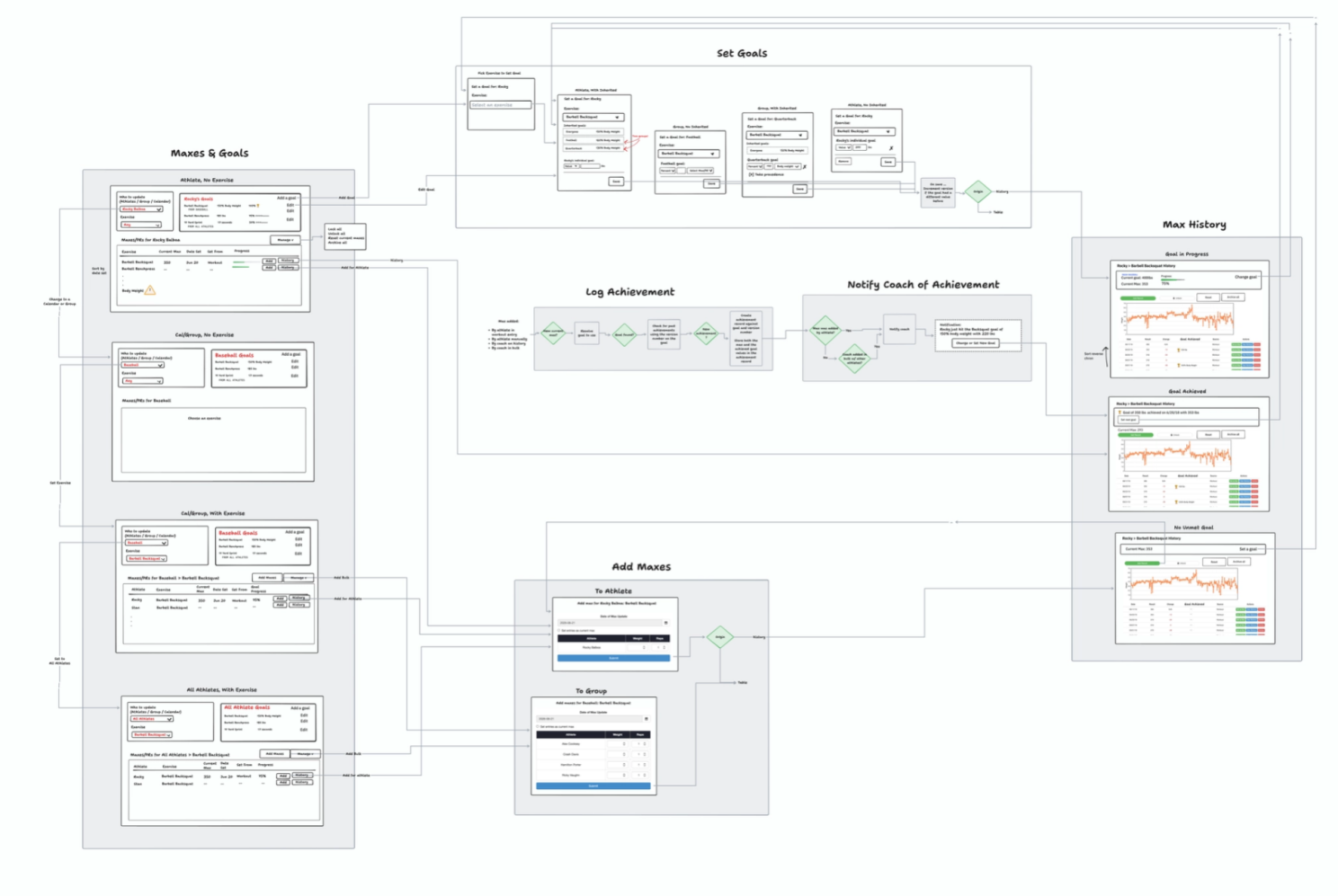
It's natural to express a product concept as mockups or drawings. But it's good know that in software, the real bones are the wires BETWEEN the screens. How you move from here to there, what information is supposed to show up or get sent along, etc. So I always draw the product concept as a "circuit" with lines between the mockups. Like "When the email comes in, we extract this info, and then populate the revision of the form here, which then shows up for approval here." Draw the lines of how you move from step to step. It will both remove a lot of ambiguity and help you have more concrete conversations with the builder.
Start with concrete cases
One last tip. It's very tempting with software to think "I'm not the only one who needs this ... let's make it general for other businesses too!" That might well be a great idea. But if it's how you start building your v1, it can land you in trouble. Every time you add an "if" to software, it gets twice as complicated. Like "we'll have a setting for this, a setting for that, and in this case, do this... in case do that..." — it just explodes in complexity. Which explodes the cost and timeline. The way to shorten the timeline is to narrow the outcome. Define specific cases that you know matter for yourself right now. It's easier to extract and generalize AFTER you know you can solve individual cases than to see the do-everything version in advance.
I hope this is helpful to any of you out there who are in the same position as my friend. I normally work with specialists in each of these roles in software teams to make progress. But with all the advancements in AI now, more and more people from outside the field need visibility into these steps to see ways to jump in and make progress. Feel very welcome to write me a note if this triggered some questions for you or if I can help somehow.